Generate HTML Documentation Instantly. Create beautiful, production-ready help sites without configuration headaches. Our Windows tool generates clean, static HTML files that you can host anywhere: drop the output into any local folder, upload to your web server, or deploy via CDN. Zero dependencies, maximum flexibility.
Windows desktop app • Works offline • Free version available
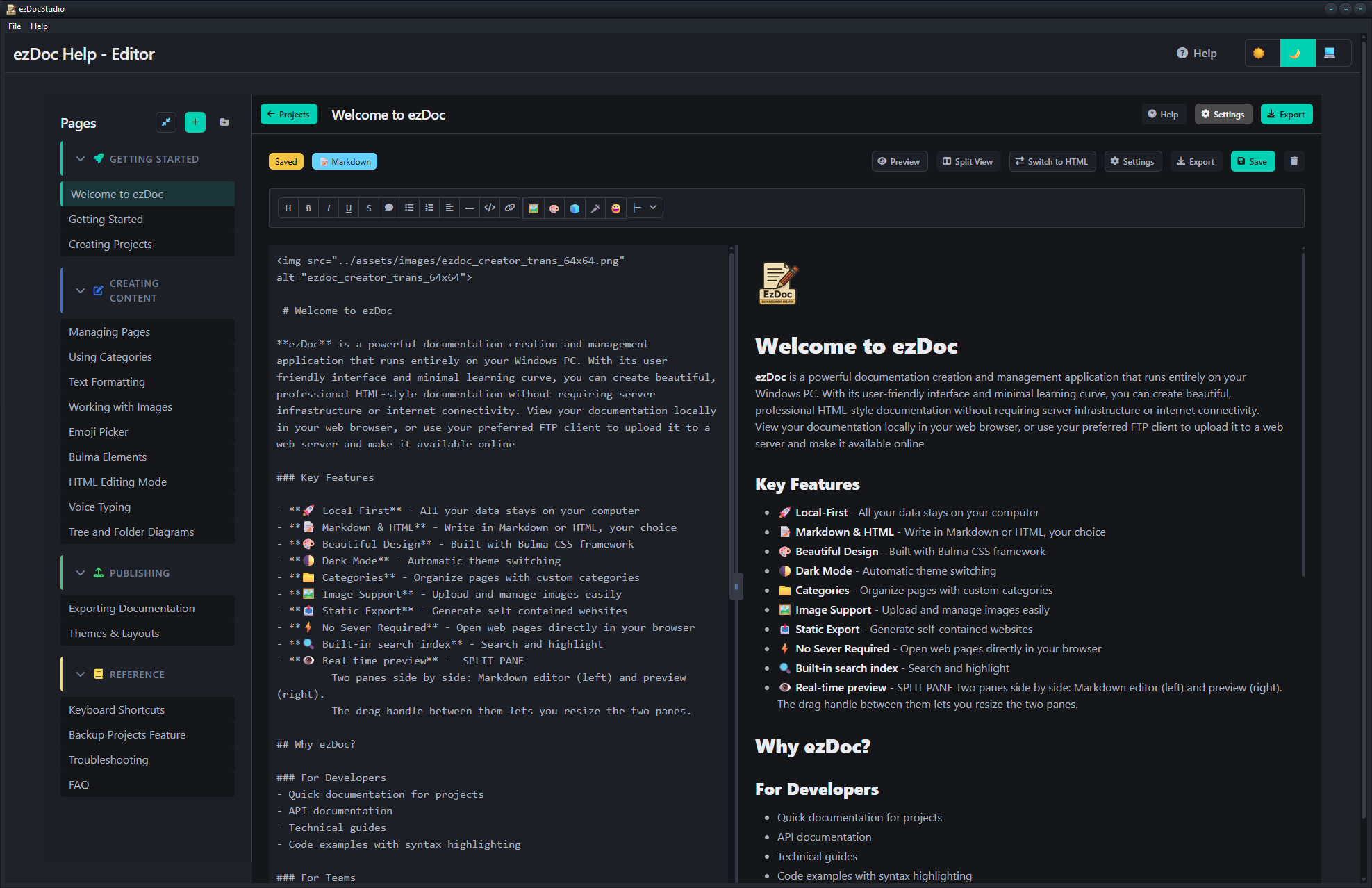
Powerful features to create world-class documentation
Write in Markdown or HTML with live preview. Support for tables, code blocks, images, and more. Use AI-written markdown files—just paste into the editor.
Real-time split view with editor on the left and live preview on the right. Draggable divider to resize panes. See changes instantly as you type.
Categories and pages with drag-and-drop reordering. Custom icons and colors for each category. Collapsible categories for better organization.
Light and dark modes with automatic system detection. Multiple layout options including left nav, right nav, and top nav.
Write once, deploy anywhere. Your HTML files are universally compatible across all browsers and devices. No server required.
Built-in search with elasticlunr.js. Search across all pages with instant results. Works offline in exported documentation.
Use Windows voice typing (Win+H) for hands-free documentation. Great for accessibility and faster content creation.
Quick access to Windows emoji picker (Win+.). Add emojis, symbols, and special characters to enhance your documentation.
Manage multiple documentation projects with ease. Switch between projects, backup/restore, and keep everything organized in one place.
Upload and manage images with built-in library. Automatic path resolution for categorized pages. Drag and drop support.
Beautiful code blocks with syntax highlighting for 180+ languages. Support for tree diagrams and box-drawing characters.
Never lose your work with automatic saving. Configurable auto-save intervals. Visual indicators for save status.
One-click backup creates a complete ZIP archive of all your projects. Extract the ZIP to restore projects on new computers or after data loss. Projects auto-discovered on startup.
Choose the plan that fits your needs
Perfect for personal use
For serious documentation
For businesses & teams
| Feature | Free | Professional | Commercial |
|---|---|---|---|
| Projects | 2 | 6 | Unlimited |
| Markdown Editor | |||
| HTML Editor | |||
| Live Preview | |||
| Split Pane Editor | |||
| Real-time Preview | |||
| Dark/Light Themes | |||
| Layout Options | |||
| Categories & Organization | |||
| Drag & Drop Reordering | |||
| Image Upload | |||
| Voice Typing | |||
| Emoji & Symbol Picker | |||
| Syntax Highlighting | |||
| Tree Diagram Support | |||
| Auto-Save | |||
| HTML Export | |||
| Project Backup/Restore | Unlimited | ||
| Built-in Search | |||
| Offline Support | |||
| Local Data Storage | |||
| Footer Customization | |||
| Remove Branding | |||
| Commercial Use | |||
| Priority Support | |||
| Updates | — | 1 Year | 1 Year |
| Price | Free | $59 | $99 |
See what our customers are saying
"ezDoc Studio cut our documentation time in half. The export to HTML is flawless and our users love the search feature."
Sarah Chen
Lead Developer, TechCorp
"Finally, a documentation tool that doesn't require a PhD to use. Simple, powerful, and the dark mode is gorgeous."
Mike Rodriguez
Indie Developer
"The ability to export as a standalone app is a game-changer. Our offline documentation has never looked better."
Emily Watson
Product Manager, Software Inc
Download the free version and start creating beautiful documentation today.
Download Free VersionWindows 10/11